Modules Constructor
The guide to the Multogram Modules Constructor: how to build your own Telegram automation module — a scenario from ready-made actions, a settings form from resources, a test and a build into an .agm file. How a module is structured, key concepts and the workflow.
The Modules Constructor is a visual editor in which you build your own automation
module: a scenario from ready-made actions (Telegram, files, network, data) and a settings form
the user fills in before running. A finished module is a single .agm file: it is installed and
run on the Modules tab, like a built-in mode.
The constructor opens from the Modules Constructor tab with the Create Module button and is available on the Pro and Max plans — see Modules Constructor in the list of modes. No programming is needed: the scenario is built from blocks, and code is written only where ready-made actions are not enough.
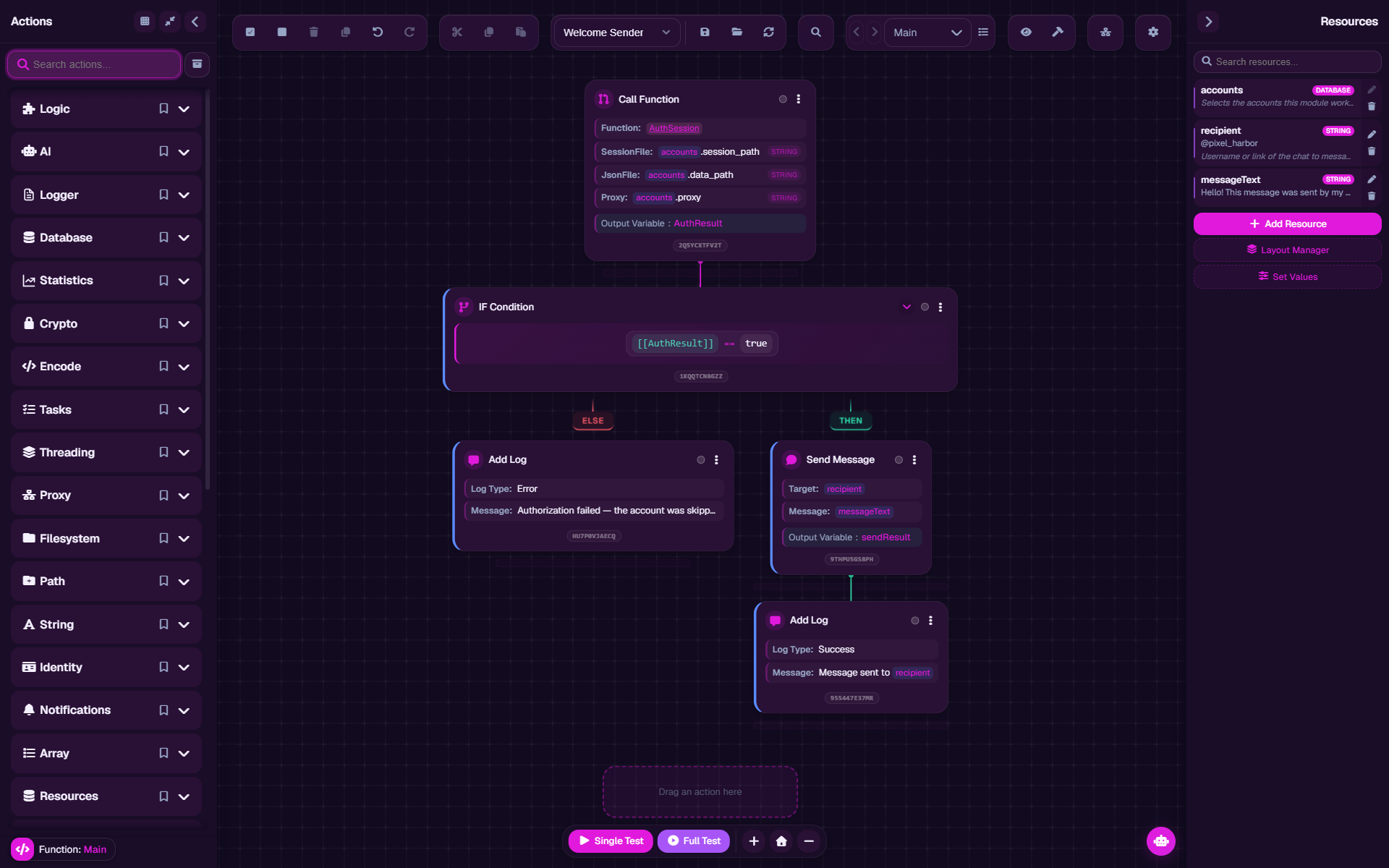
What a module consists of
| Part | What it is | Where in the constructor |
|---|---|---|
| Scenario | The module's logic: functions made of actions that run top to bottom. Work starts with the Main function | The canvas and the Actions panel |
| Settings form | The fields the user fills in before running. It is built from resources automatically | The Resources panel |
| Module data | Name, description, author, version and cover — what is visible on the module's card | The Build module window |
| Requirements | The Multogram modes the module needs. Determined from the scenario's actions | The Build module window |
Key concepts
| Concept | What it means |
|---|---|
| Action | One step of the scenario: send a message, read a file, make a request |
| Function | A named set of actions. Main is the module's entry point |
Variable [[name]] | A value the scenario computes by itself as it works |
Resource {{name}} | A setting the module's user sets. The form is built from resources |
| Thread | One line of execution. A module runs in several threads at once |
Project .agmp | The editable source of a module |
Module .agm | A sealed build for installing and running |
Workflow
Create a module. The constructor opens with a ready template: an account sign-in function and an account picker field — see Your first module.
Build the scenario from actions on the canvas — see Canvas and actions and Conditions, loops and errors.
Move the settings into resources — everything the user should choose: targets, texts, delays, files. See Resources and the module form.
Check it with a test right in the constructor — see Testing and debugging.
Save the project and build the module .agm — see Saving and building.
Sections
Your first module
A step-by-step example: accounts, a settings field, a message to a chat, a test and a build.
The constructor window
Panels, buttons, hotkeys and settings.
Canvas and actions
Adding, configuring and finding actions, inserting values.
Conditions, loops and errors
IF, FOR, FOREACH, WHILE, Try-Catch and how to write conditions.
Variables
Where they come from, types, object fields and values shared by threads.
Functions
Main, your own functions with parameters and a return value.
Resources and the module form
Field types, groups, visibility conditions, translations, test values.
Threads and accounts
How a module runs in several threads and splits accounts.
Your own code
JavaScript, Python, Node.js and command shells inside the scenario.
Testing and debugging
Tests, the variables and logs inspector, finding the causes of errors.
Saving and building
The .agmp project, the .agm build, module data and mode requirements.
AI assistant
A chat that explains and edits the module's scenario.
Modules and actions
Reference: all of the constructor's modules and their actions.
Questions and problems
Common questions and what to do if a module doesn't work.
Updated
Modules Constructor
The Modules Constructor tab in Multogram: creating your own automation modules in a visual editor — your own logic and your own settings form. .agmp projects and finished .agm modules, recent modules, requirements and tips.
Your first module
A step-by-step example in the Multogram Modules Constructor: a module that sends a message to a chat from each selected account. The new module template (Main, ProcessAccount, AuthSession), settings fields, a test and an .agm build.