Reactions Booster
The Reactions Booster mode in Multogram: each selected account puts a random reaction from your palette on every post from the list. Settings, the post link format, delays and reaction restrictions in channels.
Where in the app
Access
Accounts
Restriction risk
Reactions Booster puts emoji reactions on posts. Each selected account goes through all posts on the list and puts a random reaction from the palette on each. 10 accounts and 5 posts make 50 reactions, one from each account on each post.
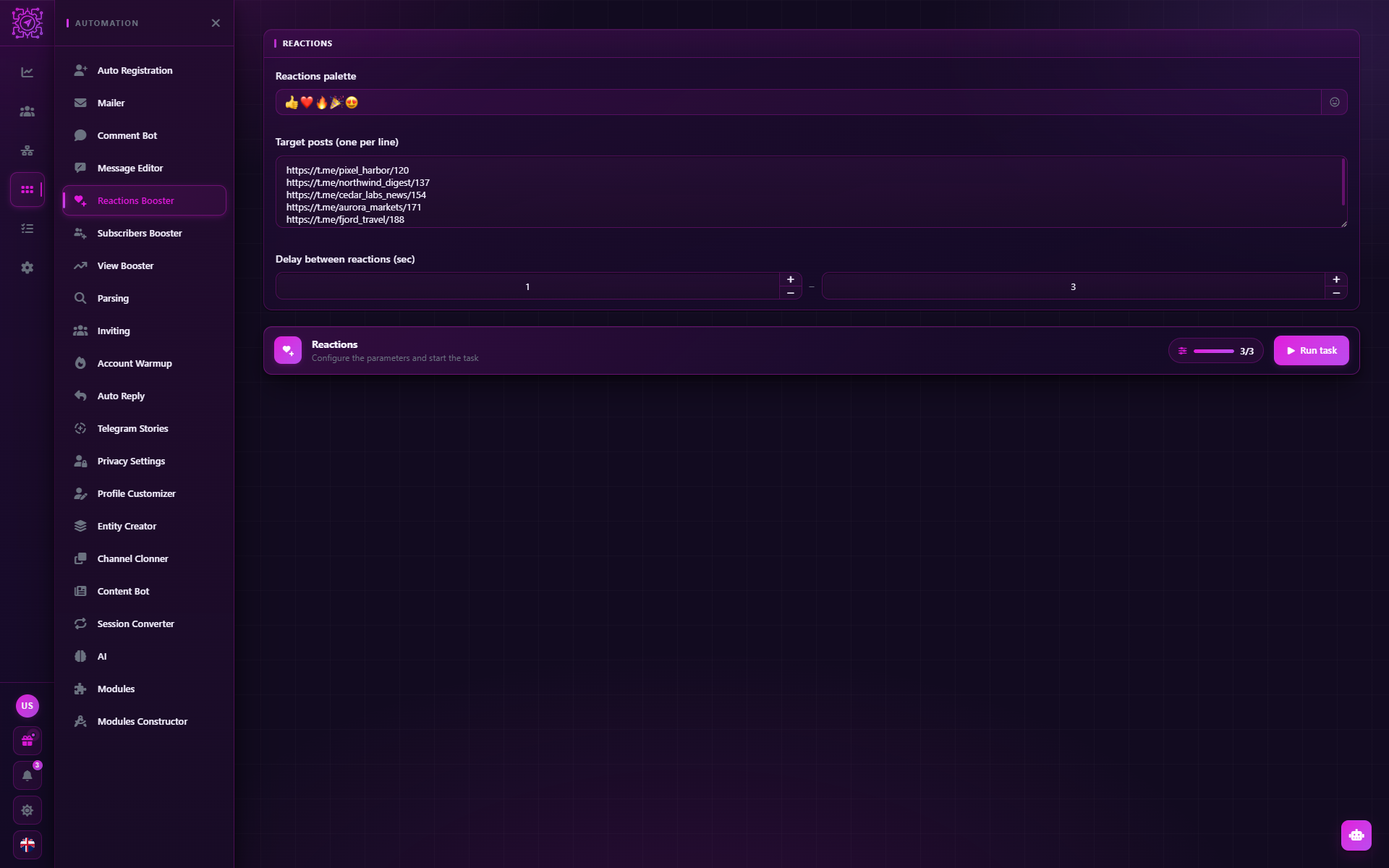
Settings
| Parameter | Default | What it does |
|---|---|---|
| Reactions palette | 👍 ❤️ 🔥 🎉 👏 | A set of emojis; each post gets a random one. Complex emojis (for example, ❤️🔥) count as one reaction |
| Target posts (one per line) | — | Links to posts, one per line. Required |
| Delay between reactions (sec) | 1–3 | The pause before each reaction, random within the range |
Post format — a link to a specific post: https://t.me/channel/123. A link to a channel without a post number
won't do: the mode doesn't know which post to pick and writes "Target message not found".
How it works
- Each account gets the whole list of posts.
- Before each post — a pause from the Delay between reactions.
- The account puts a random reaction from the palette. The log shows "Reaction … set" or the reason for the refusal.
- An error on one post doesn't stop the work: the account moves on to the next one.
If the account has already reacted to this post, the new reaction replaces it.
Limitations
- Allowed reactions. The owner of a channel or group may allow only some reactions or turn them off completely. A reaction outside the allowed set won't be placed: the log shows "This reaction is not allowed in this chat".
- Private channels. To react in a private channel or group, the account must be a member of it. Subscribe the accounts in advance — with the Subscribers Booster mode.
- The counter doesn't update instantly. Reactions from other accounts may appear in your Telegram after a minute or two.
Recommendations
- Reactions that fit the post. 🔥 and 👍 fit almost anywhere; 😢 under news about a sale looks odd.
- Not all accounts on one post. Hundreds of reactions in a minute on a post with a small reach look unnatural. Spread them over time — run the task in parts.
- Subscription first, then reactions. Reactions from channel subscribers look more natural.
- Delay. 1–3 seconds suit small volumes; for dozens of posts increase it to 3–10 seconds.
Common questions
Which link should I give?
A link to the post: open the post in Telegram → Copy Link. It looks like
https://t.me/channel/123. For private channels the link looks like https://t.me/c/1234567890/123.
Can I put a specific reaction instead of a random one?
Yes — leave one reaction in the palette.
Why are there fewer reactions on the post than accounts?
Some accounts may have got an error: the reaction isn't allowed, the account isn't a member of the private channel, FloodWait. The reasons are in the task log. An account that got a FloodWait stops working in the task by default — see Pause account on FloodWait in settings. Also, the counter in Telegram updates with a delay.
Does the mode put paid (premium) reactions?
No, only regular emoji reactions.
Updated
Message Editor
The Message Editor mode in Multogram: bulk editing of messages and comments that were already sent. It takes the database saved by Mailer or Comment Bot and rewrites the text from the same account that sent it.
View Booster
The View Booster mode in Multogram: views of posts, a channel's latest publications and stories from each selected Telegram account. Which links to give, how views are counted, delays and limitations.