Comment Bot
The Comment Bot mode in Multogram: comments under channel posts from your Telegram accounts. The Commenter writes under found posts, the Watcher monitors channels and comments on new posts right after they are published. Settings, post search, delays and recommendations.
Where in the app
Access
Accounts
Restriction risk
Comment Bot leaves comments under channel posts from the selected accounts. It works in two modes:
- Commenter — a single pass: finds the given posts and comments on them.
- Watcher — monitors channels and comments on new posts right after they are published, until the task is stopped.
Comments under a channel post are actually written into its discussion group. If the channel doesn't have one, commenting is not possible.
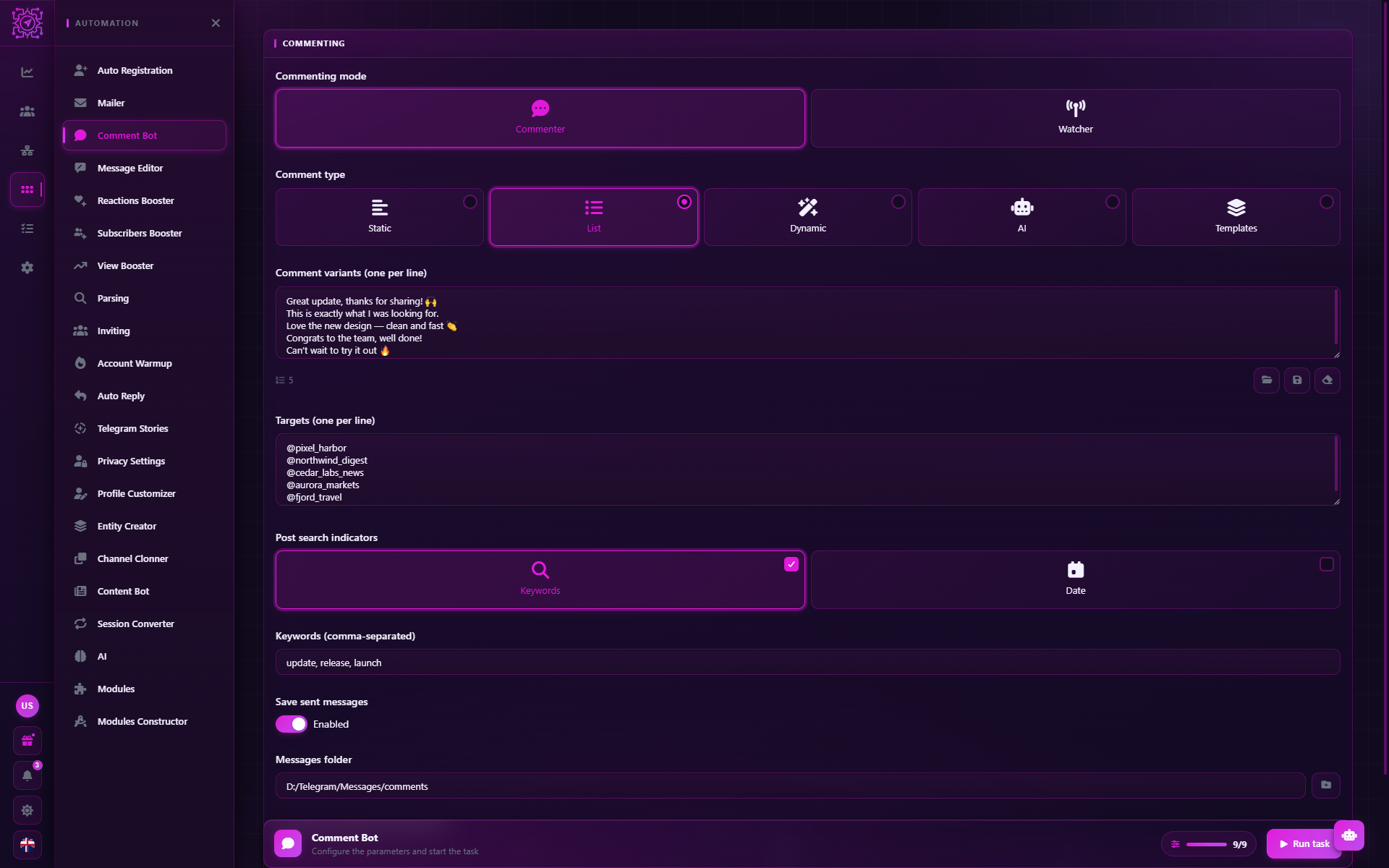
Quick setup
Choose the mode in the Commenting mode field: Commenter or Watcher.
Choose the comment type and fill in the field below it — for example, a List with 10–20 variants.
Set the targets: for the Commenter — links to posts (or channels and search indicators); for the Watcher — channels.
Start the task and pick the accounts. The accounts must be subscribed to the channels — see below.
Settings
| Parameter | Default | What it does |
|---|---|---|
| Commenting mode | Commenter | Commenter — a one-off pass over posts; Watcher — standing watch for new posts |
| Comment type | List | Static, List, Dynamic, AI or Templates — see Texts and templates |
| Comment | — | Text and attachments from the visual editor. For the Static type |
| Comment variants (one per line) | — | One variant per line; each post gets a random one. For the List type |
| Dynamic template | — | A template with spintax and tokens. For the Dynamic type |
| AI prompt | — | The instruction for the AI model for each comment. For the AI type |
| Templates | — | Saved templates. For the Templates type |
| Targets (one per line) | — | Posts or channels, one target per line — formats below |
| Post search indicators | — | Commenter only: how to find the post in the channel — Keywords and/or Date |
| Keywords (comma-separated) | — | The post must contain all of these words |
| Post date | — | A post published on this day in local time; if there are several — the newest of them |
| Save sent messages | Off | Write the comments to a database for Message Editor |
| Messages folder | — | Where to save the database: a <task ID>.db file, the messages table. The folder is created if it doesn't exist yet |
| New-post check interval (sec) | 2–5 | Watcher only: how often to check the channels |
| Delay before sending comment (sec) | 2–5 | The pause before each comment |
Target formats
| Target | Example | What gets commented |
|---|---|---|
| A link to a post | https://t.me/channel/123 | This post |
| A channel and post number | @channel:123 | Post #123 |
| A channel | @channel or https://t.me/channel | In the Commenter — the post found by keywords or date. In the Watcher — every new post |
A channel without search indicators
In Commenter mode a channel target without a link to a post works only together with Post search indicators. Without them the application doesn't know which post to comment on and writes "Target message not found" to the log.
How the Commenter works
Each account goes through all targets in random order: a pause from the Delay before sending → post search → comment → log entry. 5 accounts and 4 posts mean 20 comments, one from each account under each post.
An error on one target doesn't stop the account: it is written to the log, and the account moves on to the next target. When the targets run out, the account's thread ends.
How the Watcher works
- As many threads as accounts — this field is locked in the task window.
- Monitoring is split between accounts. Each account checks only its own share of the channels — this means fewer requests per account. A new post that is found is seen by everyone.
- Each account comments on each new post, with a pause from the Delay before sending.
- Posts that were already in the channel at start are not commented on — only the ones published after.
- On an error or FloodWait the account pauses — 5 seconds, then twice as long, up to 5 minutes — and tries again. The post isn't lost.
- Runs until stopped. To make the Watcher turn off by itself, set Stop after (min) in the task window.
Preparing the accounts
- Subscribe the accounts to the channels. In many channels only subscribers can comment, and sometimes you also need to join the discussion group. It is convenient to do this in advance with the Subscribers Booster mode.
- Fill in the profiles. A comment from an account without a name and photo looks like spam — see Profile Customizer.
Recommendations
- More text variants. Moderators delete twenty identical comments under one post right away. Use a List with many variants, Dynamic or AI.
- AI for the post's context. With the AI type, write the prompt so the comment is short and neutral: the model doesn't see the post itself, so avoid specifics that may not fit.
- Not all accounts at once. 3–5 comments from your accounts under one post look more natural than 30.
- Pauses. Don't reduce the Delay before sending to the minimum: instant comments from many accounts look like a bot.
- The Watcher's interval. 2–5 seconds give a fast reaction. If there are many channels and few accounts, increase the interval so as not to hit request rate limits.
Common questions
How is the Commenter different from the Watcher?
The Commenter comments once on already published posts and finishes. The Watcher waits for new posts and comments on them right after they appear, until the task is stopped.
Why wasn't the comment left?
Common reasons: the channel has no discussion group ("Comments are disabled for this post"), the account is not subscribed ("Join the channel/group before performing this action" or "…the discussion group"), the post wasn't found by keywords or date, the account is banned in the chat, FloodWait. The reason is in the task log; the list of messages is in Errors and messages.
How does Comment Bot find a post by keywords?
It looks in the channel for a post that contains all the given words. If several posts fit, one of them is commented on — add a date or give a link to the post itself to choose precisely.
How many comments will there be?
In the Commenter — the number of accounts × the number of targets. In the Watcher — the number of accounts for each new post.
Will adding accounts speed up the Watcher?
Yes: channels are split between accounts, and each checks fewer channels, so new posts are found faster. But there will also be more comments under each post.
Can I edit the comments afterwards?
Yes, if Save sent messages was on: open that database in Message Editor.
Updated
Mailer
The Mailer mode in Multogram: direct messages to recipients from a list, sent from your Telegram accounts. Six text types, delays, saving sent messages for later editing, how recipients are distributed and how to avoid spam block.
Auto Reply
The Auto Reply mode in Multogram: accounts answer incoming messages by themselves — by rules with conditions (contains, equals, regular expression) or with AI that decides whether to answer and writes the reply. Sources, intervals and rule setup.